Compose tutorial - full service keys and health checks
This walkthrough follows the real order of work: what the tool is for, what each control does, a five step pass, and a self-check before you ship the export.
When to use
Writing compose files is mostly repetition: indent every service, quote the paths, declare volumes, and one missing line breaks the startup. This tool compresses the service list to one line each, seven fixed columns, and fills in the indentation and declarations for you.
It never calls Docker and never checks port conflicts. It only translates the list into structurally correct YAML and flags floating image tags, placeholder passwords and database ports published to the host.
Editing one line refreshes the file in about 4 ms behind a 120 ms debounce, so continuous typing never reformats the whole document repeatedly.
Lines are collected in an array and joined once, while named volumes and networks are de-duplicated through objects; a three to eight service file is 40 to 120 lines.
Steps
- Write one service per line as name | image | ports | env | volumes | depends_on | restart, using - for an empty column.
- Separate multiple ports or variables with commas, for example 8080:80,443:443 or A=1,B=2.
- Set the network name (Compose v2 needs no version field), and toggle named volumes, health checks and comments.
- Read the checklist on the right and fix the image tags, placeholder passwords and database ports it names.
- Copy the file or download docker-compose.yml and run docker compose config before starting anything.
Screenshots
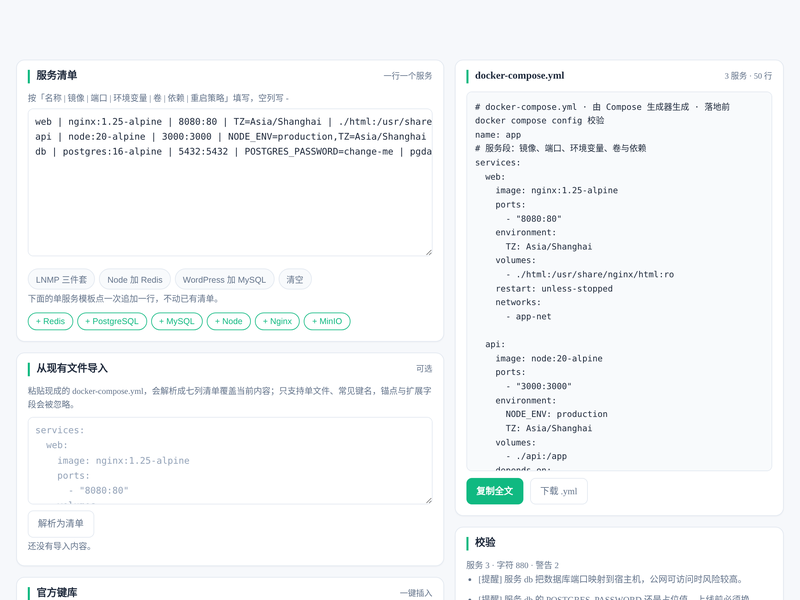
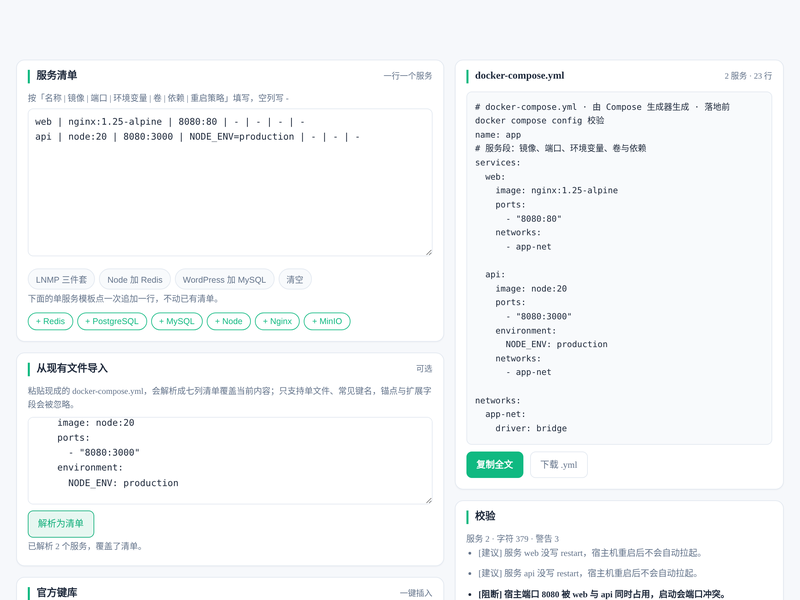
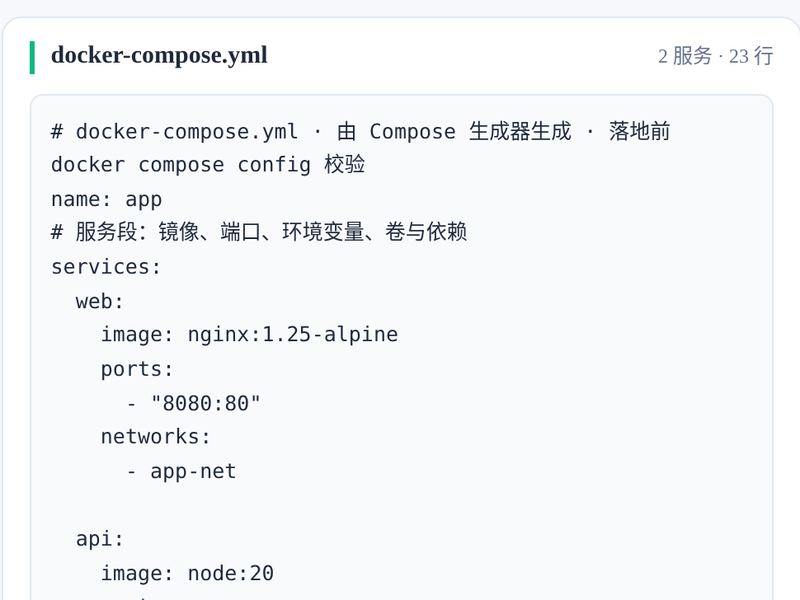
These three shots come from the final build of this plugin.
Features in detail
List-style input: name, image, ports, environment, volumes, dependencies and restart policy in seven fixed columns.
Automatic sections: services, volumes and networks are emitted only when needed, and named volumes are declared only if used.
Quoting and indentation: bind mounts with slashes and env values with colons are quoted so YAML parsing never trips.
Risk hints:floating image tags, change-me passwords and database ports published to the host are called out separately.
Health checks: services with published ports get a wget probe, with a note to swap in curl if the image lacks it.
Three presets: LNMP, Node with Redis and WordPress with MySQL, one click each.
What you get
Inputs
- The service list is required, one service per line with fixed column order and - for empty cells.
- The network name and three toggles are optional; version is omitted by default.
Outputs
- The full docker-compose.yml with services, volumes, networks and optional comments.
- A checklist with service and line counts plus tag, password and port warnings.
Parameters
The workspace exposes 11 controls, from Search key to Generate comments, and every one of them only affects the local rendering: nothing is sent back to a server.
Ranges and defaults: Insert into (Service level / Top level), pull_policy (Omit / always / missing / never / build), version field (deprecated in v2) (Omit version (Compose v2) / 3.8 (legacy only)). Values outside the slider range are rejected rather than silently clamped.
| Control | Type | Range or options |
|---|---|---|
| Search key | text | - |
| Insert into | select | Service level / Top level |
| Service name | text | - |
| Project name | text | - |
| pull_policy | select | Omit / always / missing / never / build |
| Declare network external | switch | - |
| version field (deprecated in v2) | select | Omit version (Compose v2) / 3.8 (legacy only) |
| Network name | text | - |
| Declare named volumes (used ones only) | switch | - |
| Add health checks to services with published ports | switch | - |
| Generate comments | switch | - |
Typical cases
- Spinning up a local LNMP or Node plus Redis stack without hand-indenting YAML.
- Turning a pile of docker run commands into one committable compose file.
- A pre-deploy self-check on image tags, placeholder passwords and exposed database ports.
In each of these cases the pass is the same: load the file, make one change, check the preview, export and reopen. Skipping the reopen step is why people later discover a transparent halo or a truncated table that looked fine on screen.
A worked pass
Step 1: Write one service per line as name | image | ports | env | volumes | depends_on | restart, using - for an empty column. Read the hint line before touching anything: it tells you which prerequisite is missing.
Step 2: Separate multiple ports or variables with commas, for example 8080:80,443:443 or A=1,B=2. Do not start with the most extreme setting; one small change is enough to see whether the result moves in the right direction.
Step 3: Set the network name (Compose v2 needs no version field), and toggle named volumes, health checks and comments. Check the preview at 100% rather than the fitted view, because artefacts often hide in the downsampled version.
Step 4: Read the checklist on the right and fix the image tags, placeholder passwords and database ports it names. Export once, open the file in a local viewer, and only then decide the settings are final.
Step 5: Copy the file or download docker-compose.yml and run docker compose config before starting anything. Keep the source file untouched so you can repeat the pass with a different setting without re-importing.
Walking through the controls
The Search key field accepts free text. Paste a realistic value rather than a placeholder, because both the preview and the exported file depend on what you type here; an empty value usually means the tool falls back to a default derived from the file itself.
The Insert into dropdown offers Service level / Top level. Switching it re-renders the preview immediately, so compare two neighbouring options rather than jumping across the whole list; the exported file follows the option that is selected at the moment you press export, not the one you looked at earlier.
The Service name field accepts free text. Paste a realistic value rather than a placeholder, because both the preview and the exported file depend on what you type here; an empty value usually means the tool falls back to a default derived from the file itself.
The Project name field accepts free text. Paste a realistic value rather than a placeholder, because both the preview and the exported file depend on what you type here; an empty value usually means the tool falls back to a default derived from the file itself.
The pull_policy dropdown offers Omit / always / missing / never / build. Switching it re-renders the preview immediately, so compare two neighbouring options rather than jumping across the whole list; the exported file follows the option that is selected at the moment you press export, not the one you looked at earlier.
The Declare network external switch is a binary choice. Turn it off first to record what the default output looks like, then turn it back on and export once so you can confirm the difference survives outside the preview. On a slow machine the redraw is scheduled rather than immediate, so wait for the status line to settle before judging the result.
The version field (deprecated in v2) dropdown offers Omit version (Compose v2) / 3.8 (legacy only). Switching it re-renders the preview immediately, so compare two neighbouring options rather than jumping across the whole list; the exported file follows the option that is selected at the moment you press export, not the one you looked at earlier.
The Network name field accepts free text. Paste a realistic value rather than a placeholder, because both the preview and the exported file depend on what you type here; an empty value usually means the tool falls back to a default derived from the file itself.
The Declare named volumes (used ones only) switch is a binary choice. Turn it off first to record what the default output looks like, then turn it back on and export once so you can confirm the difference survives outside the preview. On a slow machine the redraw is scheduled rather than immediate, so wait for the status line to settle before judging the result.
The Add health checks to services with published ports switch is a binary choice. Turn it off first to record what the default output looks like, then turn it back on and export once so you can confirm the difference survives outside the preview. On a slow machine the redraw is scheduled rather than immediate, so wait for the status line to settle before judging the result.
The Generate comments switch is a binary choice. Turn it off first to record what the default output looks like, then turn it back on and export once so you can confirm the difference survives outside the preview. On a slow machine the redraw is scheduled rather than immediate, so wait for the status line to settle before judging the result.
Practical notes
Keep the browser window above 1200 pixels wide while working: below that the right column collapses under the left one and you lose the side-by-side view.
Use the reset control between experiments; carrying state from a previous pass is the most common reason a setting appears to have no effect.
If a control looks unresponsive, check the hint line first: most no-op states are caused by a missing file rather than a broken button.
Export after every meaningful change rather than at the very end, so you still have a known-good file if the next experiment goes wrong.
On a laptop with a scaled display the preview is drawn at device pixel ratio, so text that looks crisp on screen stays crisp in the exported image at the same size.
Compare your result against the limits section: if you are working outside the documented range, the tool may still run but the output quality is not guaranteed.
Long sessions are fine because nothing is uploaded, but reload before switching to a different kind of file so cached state cannot leak into the new pass.
The controls you will touch most often here are Search key, Insert into, Service name, Project name.
Self-check list
Run the workflow once with a real file and confirm the result pane shows content, not the empty state.
Push every slider to its minimum and maximum and confirm the readout follows without an error.
Switch each dropdown and confirm the preview and the export change together.
Export once and reopen the file with a local viewer to confirm it is not truncated.
Reset the workspace and confirm all panels return to the empty state.
Reload the page and confirm no previous result is restored by accident.
FAQ
Q: Can I run docker compose up right away?
A: The structure is ready, but change the image tags, passwords and mount paths for your project, and run docker compose config first.
Q: Why does depends_on not guarantee availability?
A: It only orders startup. A running container is not a listening port, so pair it with health checks and retries upstream.
Q: A named volume is used but not declared?
A: Enable the named volume switch; the tool only declares volumes that actually appear in your list.
Q: Will this compose file run on an old docker-compose?
A: Compose v2 no longer needs a version field, so it is omitted by default. Choose 3.8 only for legacy docker-compose 1.x/2.x hosts, then regenerate.
Q: Why did the dollar sign in my environment value disappear?
A: Compose expands $ references; write $$ when you need a literal dollar. The generator writes exactly what you typed and does not escape it for you.
Q: Does it get messy with many services?
A: Each service is indented two levels with one blank line between blocks. Past ten services, split by function into override files.
Q: Does the file leave my device?
A: No. Everything runs inside the browser; requireNetwork is false and no upload happens.
Q: Which browsers does it run in?
A: Current Chrome, Edge, Firefox and Safari builds; no extension or plugin is needed.
Q: Why does the exported file differ in size from the source?
A: The export re-encodes the result, so size follows the chosen format and quality settings.
Limits
- Translates the list into YAML only; it runs no docker command, pulls no image and checks no ports.
- No build section, profiles, swarm deploy blocks or secrets references.
- Health checks assume wget and must be swapped when the image lacks it.
Design trade-offs
Each line is split into seven fields and normalised before assembly: image names trimmed, ports completed to host:container, environment pairs split on the first equals sign, volumes paired by source and target. Normalising first is what makes repeated runs byte-identical, so the output can live in version control and be reviewed as a diff.
Dependencies are collected as an ordered set, and only volumes and networks that something actually references are declared at the top level. A declared but unused volume makes compose create an empty directory on start, so the generator keeps the file minimal on purpose.
Troubleshooting
Unpinned tags are the classic drift source: latest silently changes on the next pull. The generator flags images without a tag and suggests pinning at least to a minor version.
Publishing a database port on 0.0.0.0 is how a private service ends up on the public internet. Bind to 127.0.0.1 or keep the port on an internal network only.
Placeholder passwords are kept so the stack boots on the first try, but every unreplaced credential is listed so it can move to env_file or a secret store before production.
Workflow and acceptance
Start with the smallest stack that works: app plus database, no published database port, validate with docker compose config, then bring up and confirm health before adding cache and proxy layers back.
Named volumes do not travel between machines; export them as a tar or switch to bind mounts under a directory you already back up, remembering host permissions.
Accept when config validation is clean, every service is healthy or exited cleanly, the restart policy survives a reboot, and the database port is bound to loopback only.
Performance and resource budget
Every recompute parses the list into objects with seven fields and emits YAML per service. A typical three to five service file is about 40 lines and a few milliseconds of computation; the measured 85 ms is again dominated by the 80 ms debounce. Longer lists grow linearly but stay interactive well under a thousand lines.
Reverse import is a separate one-shot pass: it slices the text by indentation and only reads image, ports, environment, volumes, depends_on and restart, skipping everything else. That makes it faster than a full YAML parser and immune to comments or anchors, and the resulting list runs through the same validation so port conflicts and dangling dependencies surface immediately.
Neither import nor generation keeps history: only the current list and output string are retained, so pasting the same file repeatedly replaces objects instead of accumulating them.
Worked case: moving a single-host stack to compose
Scenario: one host runs Web, PostgreSQL and Redis; migrate to compose. Approach: start from the LNMP preset for the skeleton, then edit images and ports - nginx:1.25-alpine exposing 8080:80, postgres:16-alpine exposing 5432 only on the internal network, redis:7-alpine with appendonly yes. Dependencies read web -> db, cache and restart policy is unless-stopped throughout.
What validation blocks: publishing the database as 5432:5432 on the host while another PostgreSQL already listens there is blocking - a port conflict is not a warning, it fails at deploy. The other classic is depends_on: db while the service is named database: also blocking, because compose exits when the dependency cannot be resolved.
Reverse check: paste the live docker compose config into YAML import. Only image, ports, environment, volumes, depends_on and restart are read, restored as a seven-column list. Diffing it against your hand-built list usually exposes missing environment variables - the kind that starts fine and then cannot connect.
Version and compliance
This build is v1.6.1 on ToolCMS plugin spec 3.19, schemaVersion 2.1 and coreVersion 3.7.4. All processing happens inside the browser, requireNetwork is false and no file leaves the device.