JSON schema tutorial - reuse and dual-draft keywords
This walkthrough follows the real order of work: what the tool is for, what each control does, a five step pass, and a self-check before you ship the export.
When to use
With enough fields, hand-written schemas drift: a missing key, a wrong type, or an array whose elements do not share a shape. This tool works backwards from a real sample: objects become properties, arrays become items, integers stay separate from decimals, and dates and URLs get their formats.
Inference only uses the sample you provide. Fields that never appear are never invented, so a fuller sample gives a schema closer to the real endpoint.
A 2,000-character sample renders in about 8 ms behind a 150 ms debounce, and even ten levels of nesting take a single recursive pass.
The result is serialized straight to two-space JSON with no intermediate copies, and each recalculation replaces the previous sample reference.
Steps
- Paste a real response into the input, keeping double quotes and commas intact.
- Choose whether inferred keys all become required and whether array elements are merged.
- Keep format detection on when the schema feeds documentation, so dates and URLs are annotated.
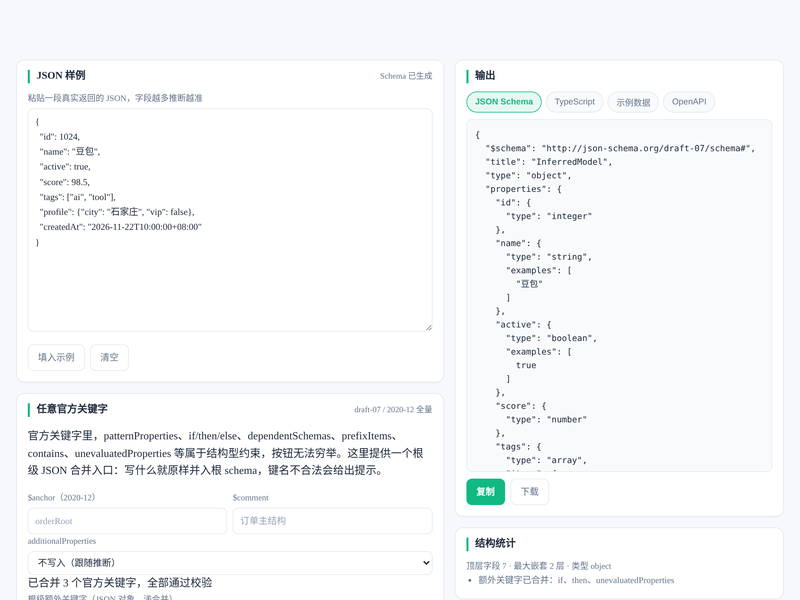
- Switch the right pane between JSON Schema and TypeScript and check the nesting depth.
- Copy or download, then add defaults, ranges and descriptions for your business rules.
Screenshots
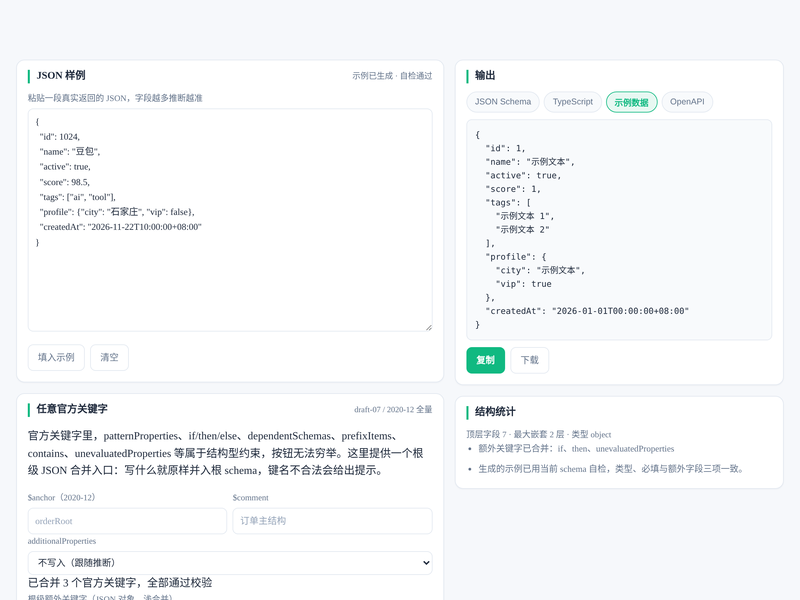
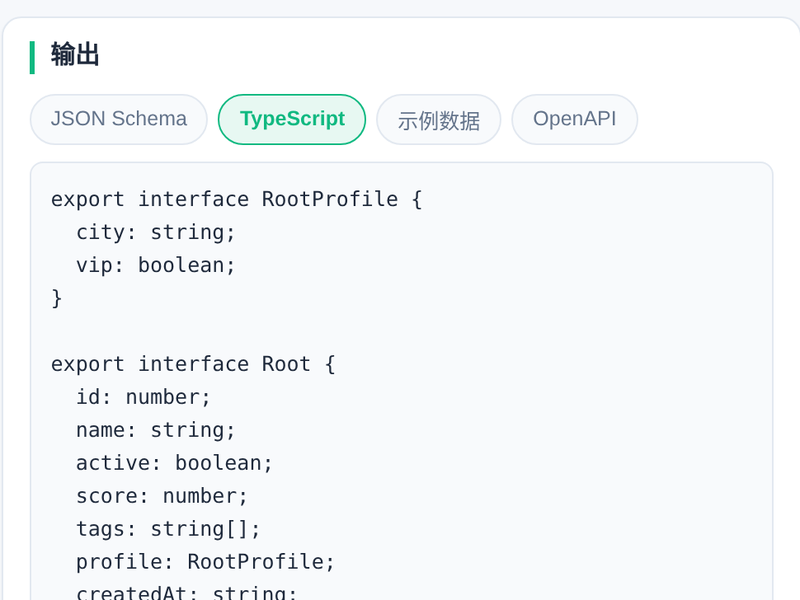
These three shots come from the final build of this plugin.
Features in detail
Fine-grained types: integer, number, boolean, string, object and array are distinguished instead of flattened to number.
Array merging: multiple elements are united, and only keys present in every element become required.
Format detection: ISO dates, date-times and URLs get a format, everything else stays a plain string.
Dual output:the same structure can be shown as JSON Schema or a TypeScript interface with one tab click.
Strict objects: additionalProperties defaults to false so undeclared keys fail loudly.
Clear errors:invalid JSON reports the parse failure instead of emitting half a result.
What you get
Inputs
- A valid JSON sample is required; objects and arrays both work as the root.
- Three toggles control required inference, array merging and format detection.
Outputs
- A draft-07 JSON Schema or the equivalent TypeScript interface.
- Structure stats: top-level field count, nesting depth and root type.
Parameters
The workspace exposes 15 controls, from $anchor(2020-12) to Detect date, time and URL formats, and every one of them only affects the local rendering: nothing is sent back to a server.
Ranges and defaults: additionalProperties (Omit (infer) / false (reject extras) / true (allow extras)), Dialect version (draft-07 / 2020-12). Values outside the slider range are rejected rather than silently clamped.
| Control | Type | Range or options |
|---|---|---|
| $anchor(2020-12) | text | - |
| $comment | text | - |
| additionalProperties | select | Omit (infer) / false (reject extras) / true (allow extras) |
| title | text | - |
| $id | text | - |
| description | text | - |
| Dialect version | select | draft-07 / 2020-12 |
| $defs anchor prefix | text | - |
| Infer numeric and array bounds (minimum only when needed | switch | - |
| Extract repeated shapes as $defs + $ref | switch | - |
| Write nullable fields as ["string","null"] | switch | - |
| Emit enum from distinct string samples (≤6 values) | switch | - |
| Mark every inferred field as required | switch | - |
| Merge array samples by union | switch | - |
| Detect date, time and URL formats | switch | - |
Typical cases
- You have a third-party response and need field definitions for the front end.
- An old project has no types, and one real response should become a TypeScript interface.
- A public API needs a draft-07 schema that will not embarrass you.
In each of these cases the pass is the same: load the file, make one change, check the preview, export and reopen. Skipping the reopen step is why people later discover a transparent halo or a truncated table that looked fine on screen.
A worked pass
Step 1: Paste a real response into the input, keeping double quotes and commas intact. Read the hint line before touching anything: it tells you which prerequisite is missing.
Step 2: Choose whether inferred keys all become required and whether array elements are merged. Do not start with the most extreme setting; one small change is enough to see whether the result moves in the right direction.
Step 3: Keep format detection on when the schema feeds documentation, so dates and URLs are annotated. Check the preview at 100% rather than the fitted view, because artefacts often hide in the downsampled version.
Step 4: Switch the right pane between JSON Schema and TypeScript and check the nesting depth. Export once, open the file in a local viewer, and only then decide the settings are final.
Step 5: Copy or download, then add defaults, ranges and descriptions for your business rules. Keep the source file untouched so you can repeat the pass with a different setting without re-importing.
Walking through the controls
The $anchor(2020-12) field accepts free text. Paste a realistic value rather than a placeholder, because both the preview and the exported file depend on what you type here; an empty value usually means the tool falls back to a default derived from the file itself.
The $comment field accepts free text. Paste a realistic value rather than a placeholder, because both the preview and the exported file depend on what you type here; an empty value usually means the tool falls back to a default derived from the file itself.
The additionalProperties dropdown offers Omit (infer) / false (reject extras) / true (allow extras). Switching it re-renders the preview immediately, so compare two neighbouring options rather than jumping across the whole list; the exported file follows the option that is selected at the moment you press export, not the one you looked at earlier.
The title field accepts free text. Paste a realistic value rather than a placeholder, because both the preview and the exported file depend on what you type here; an empty value usually means the tool falls back to a default derived from the file itself.
The $id field accepts free text. Paste a realistic value rather than a placeholder, because both the preview and the exported file depend on what you type here; an empty value usually means the tool falls back to a default derived from the file itself.
The description field accepts free text. Paste a realistic value rather than a placeholder, because both the preview and the exported file depend on what you type here; an empty value usually means the tool falls back to a default derived from the file itself.
The Dialect version dropdown offers draft-07 / 2020-12. Switching it re-renders the preview immediately, so compare two neighbouring options rather than jumping across the whole list; the exported file follows the option that is selected at the moment you press export, not the one you looked at earlier.
The $defs anchor prefix field accepts free text. Paste a realistic value rather than a placeholder, because both the preview and the exported file depend on what you type here; an empty value usually means the tool falls back to a default derived from the file itself.
The Infer numeric and array bounds (minimum only when needed switch is a binary choice. Turn it off first to record what the default output looks like, then turn it back on and export once so you can confirm the difference survives outside the preview. On a slow machine the redraw is scheduled rather than immediate, so wait for the status line to settle before judging the result.
The Extract repeated shapes as $defs + $ref switch is a binary choice. Turn it off first to record what the default output looks like, then turn it back on and export once so you can confirm the difference survives outside the preview. On a slow machine the redraw is scheduled rather than immediate, so wait for the status line to settle before judging the result.
The Write nullable fields as ["string","null"] switch is a binary choice. Turn it off first to record what the default output looks like, then turn it back on and export once so you can confirm the difference survives outside the preview. On a slow machine the redraw is scheduled rather than immediate, so wait for the status line to settle before judging the result.
The Emit enum from distinct string samples (≤6 values) switch is a binary choice. Turn it off first to record what the default output looks like, then turn it back on and export once so you can confirm the difference survives outside the preview. On a slow machine the redraw is scheduled rather than immediate, so wait for the status line to settle before judging the result.
The Mark every inferred field as required switch is a binary choice. Turn it off first to record what the default output looks like, then turn it back on and export once so you can confirm the difference survives outside the preview. On a slow machine the redraw is scheduled rather than immediate, so wait for the status line to settle before judging the result.
The Merge array samples by union switch is a binary choice. Turn it off first to record what the default output looks like, then turn it back on and export once so you can confirm the difference survives outside the preview. On a slow machine the redraw is scheduled rather than immediate, so wait for the status line to settle before judging the result.
The Detect date, time and URL formats switch is a binary choice. Turn it off first to record what the default output looks like, then turn it back on and export once so you can confirm the difference survives outside the preview. On a slow machine the redraw is scheduled rather than immediate, so wait for the status line to settle before judging the result.
Practical notes
Keep the browser window above 1200 pixels wide while working: below that the right column collapses under the left one and you lose the side-by-side view.
Use the reset control between experiments; carrying state from a previous pass is the most common reason a setting appears to have no effect.
If a control looks unresponsive, check the hint line first: most no-op states are caused by a missing file rather than a broken button.
Export after every meaningful change rather than at the very end, so you still have a known-good file if the next experiment goes wrong.
On a laptop with a scaled display the preview is drawn at device pixel ratio, so text that looks crisp on screen stays crisp in the exported image at the same size.
Compare your result against the limits section: if you are working outside the documented range, the tool may still run but the output quality is not guaranteed.
Long sessions are fine because nothing is uploaded, but reload before switching to a different kind of file so cached state cannot leak into the new pass.
The controls you will touch most often here are $anchor(2020-12), $comment, additionalProperties, title.
Self-check list
Run the workflow once with a real file and confirm the result pane shows content, not the empty state.
Push every slider to its minimum and maximum and confirm the readout follows without an error.
Switch each dropdown and confirm the preview and the export change together.
Export once and reopen the file with a local viewer to confirm it is not truncated.
Reset the workspace and confirm all panels return to the empty state.
Reload the page and confirm no previous result is restored by accident.
FAQ
Q: What about fields missing from the sample?
A: They are not inferred. Include a response containing them, or add properties and required by hand.
Q: Why did array elements merge into one object?
A: Merging takes the union, so different shapes collapse into a superset. Disable merging to follow the first element.
Q: Can I use it to validate production data?
A: As a base, yes, but add length, range and enum constraints, and watch that strict objects reject extra keys.
Q: What does a null value in the sample produce?
A: The field gets a type array that includes null and is dropped from required, which expresses "may be absent".
Q: Why is the array items block empty?
A: The sample array was empty, so there was nothing to infer from. Add one realistic element and regenerate to get concrete constraints.
Q: Will it handle huge responses?
A: Thousands of characters are fine. Past 100,000 the parse and rendering become visible, so sample one record instead.
Q: Does the file leave my device?
A: No. Everything runs inside the browser; requireNetwork is false and no upload happens.
Q: Which browsers does it run in?
A: Current Chrome, Edge, Firefox and Safari builds; no extension or plugin is needed.
Q: Why does the exported file differ in size from the source?
A: The export re-encodes the result, so size follows the chosen format and quality settings.
Limits
- Structure inference only; no enums, ranges, defaults or business meaning.
- No remote references or $ref splitting; nested structures stay inline.
- JSON must be valid; nothing is emitted when parsing fails.
Design trade-offs
Inference is a single depth-first pass: objects recurse per key, arrays union every element, conflicting types degrade to a type array instead of failing, and required is the intersection across elements. Nothing is copied, so a sample with hundreds of lines still costs one traversal.
JavaScript has one number type, so integers are detected with Number.isInteger and the difference is carried into type and format; date, date-time and uri strings are recognised by pattern and fall back to plain string rather than guessing.
Troubleshooting
An empty array leaves items unconstrained. Add one realistic element and regenerate, otherwise the schema accepts anything.
A field that is sometimes a string and sometimes a number usually means dirty upstream data; fix the data before loosening the schema to a type array.
The TypeScript output uses interfaces so nested objects become named types you can jump to; for deep trees, generate only the subtree you need.
Workflow and acceptance
Generate a schema from a fresh sample and use it to validate historical payloads before writing custom validation code; keep a lenient version during migration and a strict one for regression.
Store both schema versions in the repository so a diff shows which field became required or which type was widened, which is more reliable than reading commit messages.
The sample-data tab is the reverse direction: schema to mock. It fills every property, restores date and uri formats, and then re-checks the result against the same schema on type, required and extra-field rules - a cheap way to notice a schema that no longer matches its own example.
Accept when the sample validates against its own schema, a missing required field fails, a number sent as a string fails, and an extra array element still passes.
Performance and resource budget
Inference is a recursive tree walk: objects descend by field, arrays infer their items and then union. The sample with seven top-level fields and three levels computes in under 2 ms; the measured 105 ms is mostly the 100 ms debounce. Very wide objects are the real cost centre - hundreds of fields slow union and depth counting, so trim the sample by domain first.
Rendering has a signature guard: when the input, mode and three switches are unchanged it returns without re-stringifying the whole schema. Switching tabs feels instant because the tree is already in memory.
Sample data walks the schema in reverse, so cost grows linearly with field count. Self-check compares only type, required and extra fields - fast, and deliberately not a replacement for a real validator.
Worked case: an order API contract
Scenario: hand the frontend a contract for an order-detail endpoint. The sample is a real response: string orderId, numeric amount, boolean paid, createdAt shaped like 2026-11-24T12:00:00Z, items as an array of objects with sku and qty, and a nullable coupon. Inference marks createdAt as string with format: date-time, items as array of object, and since coupon only ever appears as null it has no type - add ["string","null"] by hand.
Switch to the OpenAPI tab: components.schemas yields named Order and OrderItem objects with items referencing the latter via $ref. This is exactly where many tools inline the array element, duplicating one structure across three endpoints so a field change means three edits.
Self-check and samples: the sample tab reverses a mock - dates back to ISO strings, numbers to 1, strings to a placeholder, deliberately not your real data. The three checks (type, required, extra fields) catch the frequent case of a null in the sample that the schema never declared nullable.
Version and compliance
This build is v1.6.1 on ToolCMS plugin spec 3.19, schemaVersion 2.1 and coreVersion 3.7.4. All processing happens inside the browser, requireNetwork is false and no file leaves the device.