Nginx tutorial - listen, proxy and access hardening
This walkthrough follows the real order of work: what the tool is for, what each control does, a five step pass, and a self-check before you ship the export.
When to use
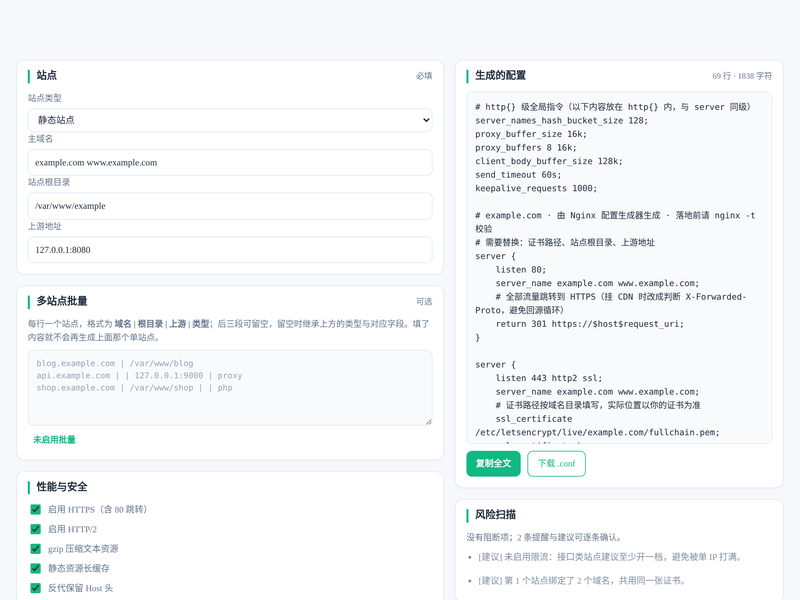
The hard part of Nginx is not syntax but remembering which directives belong together: which certificate lines HTTPS needs, which headers a proxy must forward, how long static assets should be cached, and where rate limiting goes. This tool turns those choices into checkboxes and prints a deployable server block with a note above each section.
It only assembles text. It never connects to your server or reads existing configuration, so the result is a safe starting point you can paste into a sites directory or use as a template.
Changing an option recalculates the block in about 5 ms behind a 120 ms debounce so keystrokes never rebuild the whole file repeatedly.
Lines are collected in an array and joined once instead of concatenated string by string; a typical result is 40 to 90 lines, and switching site type leaves nothing from the previous build.
Steps
- Pick a site type and fill the domain; reverse proxies need host:port, static sites need an absolute document root.
- Toggle HTTPS, HTTP/2, gzip, caching, rate limiting and security headers; the output and risk list recompute instantly.
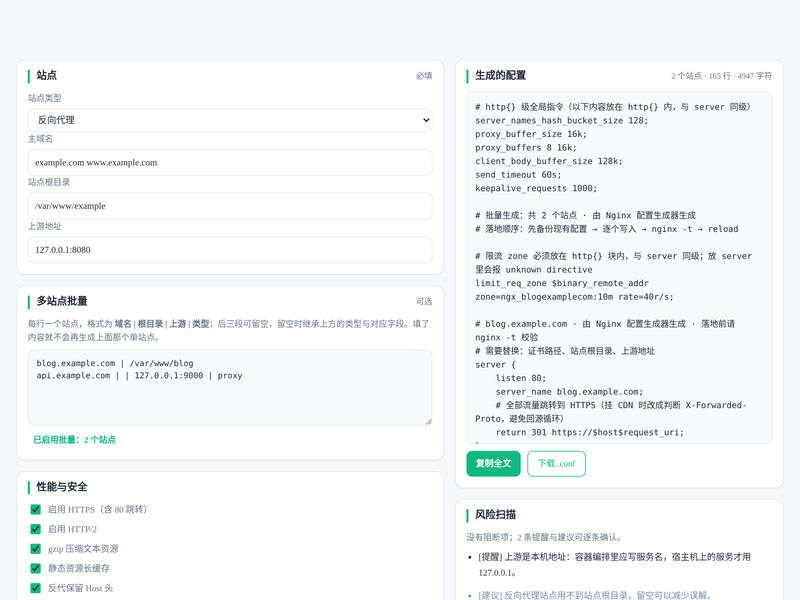
- To change several sites at once, write one per line as domain | root | upstream | type and leave columns empty to inherit defaults.
- Read the risk scan: clear every blocking item first, then confirm cautions; tips are optional optimisations.
- Copy the verification commands and roll out as backup, write, nginx -t, reload, then curl to confirm redirects and headers.
Screenshots
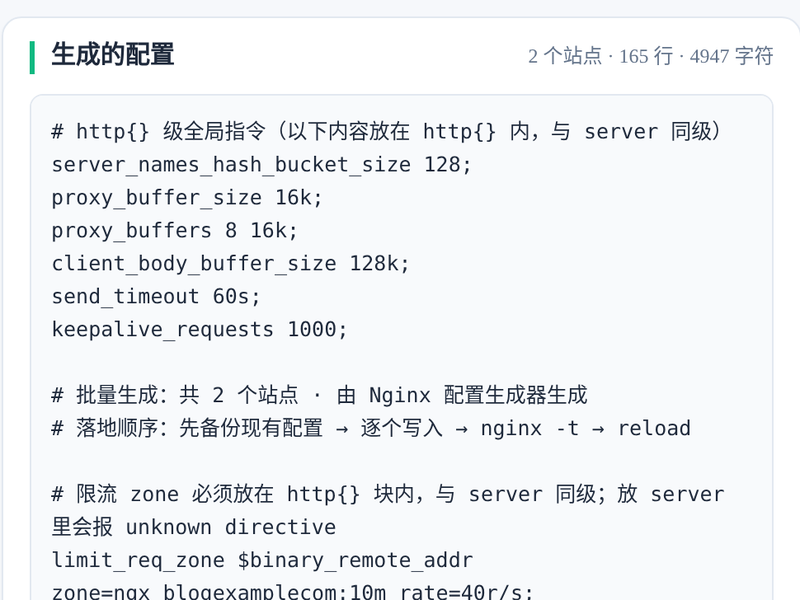
These three shots come from the final build of this plugin.
Features in detail
Four site types: static, reverse proxy, PHP and single-page app, each with its own location and try_files pattern.
Multi-site batch: one line per site with domain | root | upstream | type; empty columns inherit the defaults above.
Tiered risk scan: blocking / caution / tip levels covering missing upstream port, relative document root, 127.0.0.1 inside containers, HSTS without HTTPS, rate limits that are too low and duplicate zones.
Verification commands: nginx -t plus reload, protocol-aware curl checks and an openssl certificate expiry check when HTTPS is on.
HTTPS and HTTP/2: adds the 443 listener, certificate paths, TLS versions and the port 80 redirect block.
Performance and security switches: gzip, long-lived static caching, automatic burst sizing, HSTS and three baseline headers, each with a usage note.
What you get
Inputs
- Site type, domain, document root or upstream; in batch mode one site per line with pipe-separated columns.
Outputs
- A ready-to-land server block, a three-tier risk list and copy-ready verification commands.
Parameters
The workspace exposes 40 controls, from Site type to Disable session tickets (forward secrecy), and every one of them only affects the local rendering: nothing is sent back to a server.
Ranges and defaults: Site type (Static / Reverse proxy / PHP site / SPA), Rate limit: requests per second (0 = off) (0–200 (default 0)), proxy_buffering (on (buffered) / off (SSE / streaming)), Main location modifier (Prefix / / Exact = / Priority ^~ / Regex ~ (case-sensitive) / Regex ~* (case-insensitive)), CORS (Off / Any origin (no credentials) / Named origins with credentials), error_log level (Default / warn / error / crit). Values outside the slider range are rejected rather than silently clamped.
| Control | Type | Range or options |
|---|---|---|
| Site type | select | Static / Reverse proxy / PHP site / SPA |
| Primary domain | text | - |
| Site root | text | - |
| Upstream address | text | - |
| Enable HTTPS with port 80 redirect | switch | - |
| Enable HTTP/2 | switch | - |
| gzip text compression | switch | - |
| Long cache for static assets | switch | - |
| Preserve Host header | switch | - |
| Security headers (no CSP) | switch | - |
| HSTS (HTTPS only) | switch | - |
| Rate limit: requests per second (0 = off) | range | 0–200 (default 0) |
| Listen address | text | - |
| backlog | number | - |
| keepalive_timeout | text | - |
| client_max_body_size | text | - |
| Listen on IPv6 too ([::]) | switch | - |
| reuseport per core | switch | - |
| sendfile / tcp_nopush zero-copy | switch | - |
| server_tokens off | switch | - |
| connect_timeout | text | - |
| read_timeout | text | - |
| send_timeout | text | - |
| proxy_buffering | select | on (buffered) / off (SSE / streaming) |
| WebSocket upgrade (Upgrade / Connection) | switch | - |
| Proxy cache (static GET and API) | switch | - |
| Main location modifier | select | Prefix / / Exact = / Priority ^~ / Regex ~ (case-sensitive) / Regex ~* (case-insensitive) |
| allow allowlist | text | - |
| deny denylist | text | - |
| basic auth file | text | - |
| CORS | select | Off / Any origin (no credentials) / Named origins with credentials |
| CORS allowed origins (credential mode) | text | - |
| limit_req burst | number | - |
| limit_conn concurrency | number | - |
| access_log | text | - |
| error_log level | select | Default / warn / error / crit |
| Error code | text | - |
| Error page path | text | - |
| OCSP stapling | switch | - |
| Disable session tickets (forward secrecy) | switch | - |
Typical cases
- Updating several sites on one server, promoting staging config to production, or inheriting an Nginx setup that needs security and caching policies.
In each of these cases the pass is the same: load the file, make one change, check the preview, export and reopen. Skipping the reopen step is why people later discover a transparent halo or a truncated table that looked fine on screen.
A worked pass
Step 1: Pick a site type and fill the domain; reverse proxies need host:port, static sites need an absolute document root. Read the hint line before touching anything: it tells you which prerequisite is missing.
Step 2: Toggle HTTPS, HTTP/2, gzip, caching, rate limiting and security headers; the output and risk list recompute instantly. Do not start with the most extreme setting; one small change is enough to see whether the result moves in the right direction.
Step 3: To change several sites at once, write one per line as domain | root | upstream | type and leave columns empty to inherit defaults. Check the preview at 100% rather than the fitted view, because artefacts often hide in the downsampled version.
Step 4: Read the risk scan: clear every blocking item first, then confirm cautions; tips are optional optimisations. Export once, open the file in a local viewer, and only then decide the settings are final.
Step 5: Copy the verification commands and roll out as backup, write, nginx -t, reload, then curl to confirm redirects and headers. Keep the source file untouched so you can repeat the pass with a different setting without re-importing.
Walking through the controls
The Site type dropdown offers Static / Reverse proxy / PHP site / SPA. Switching it re-renders the preview immediately, so compare two neighbouring options rather than jumping across the whole list; the exported file follows the option that is selected at the moment you press export, not the one you looked at earlier.
The Primary domain field accepts free text. Paste a realistic value rather than a placeholder, because both the preview and the exported file depend on what you type here; an empty value usually means the tool falls back to a default derived from the file itself.
The Site root field accepts free text. Paste a realistic value rather than a placeholder, because both the preview and the exported file depend on what you type here; an empty value usually means the tool falls back to a default derived from the file itself.
The Upstream address field accepts free text. Paste a realistic value rather than a placeholder, because both the preview and the exported file depend on what you type here; an empty value usually means the tool falls back to a default derived from the file itself.
The Enable HTTPS with port 80 redirect switch is a binary choice. Turn it off first to record what the default output looks like, then turn it back on and export once so you can confirm the difference survives outside the preview. On a slow machine the redraw is scheduled rather than immediate, so wait for the status line to settle before judging the result.
The Enable HTTP/2 switch is a binary choice. Turn it off first to record what the default output looks like, then turn it back on and export once so you can confirm the difference survives outside the preview. On a slow machine the redraw is scheduled rather than immediate, so wait for the status line to settle before judging the result.
The gzip text compression switch is a binary choice. Turn it off first to record what the default output looks like, then turn it back on and export once so you can confirm the difference survives outside the preview. On a slow machine the redraw is scheduled rather than immediate, so wait for the status line to settle before judging the result.
The Long cache for static assets switch is a binary choice. Turn it off first to record what the default output looks like, then turn it back on and export once so you can confirm the difference survives outside the preview. On a slow machine the redraw is scheduled rather than immediate, so wait for the status line to settle before judging the result.
The Preserve Host header switch is a binary choice. Turn it off first to record what the default output looks like, then turn it back on and export once so you can confirm the difference survives outside the preview. On a slow machine the redraw is scheduled rather than immediate, so wait for the status line to settle before judging the result.
The Security headers (no CSP) switch is a binary choice. Turn it off first to record what the default output looks like, then turn it back on and export once so you can confirm the difference survives outside the preview. On a slow machine the redraw is scheduled rather than immediate, so wait for the status line to settle before judging the result.
The HSTS (HTTPS only) switch is a binary choice. Turn it off first to record what the default output looks like, then turn it back on and export once so you can confirm the difference survives outside the preview. On a slow machine the redraw is scheduled rather than immediate, so wait for the status line to settle before judging the result.
The Rate limit: requests per second (0 = off) slider is bounded by 0–200 (default 0). Keep it near the default for a first pass, then move one step at a time: each step is visible in the preview, and moving it in large jumps makes it impossible to tell which setting produced the artefact you are trying to remove. Values outside the range are rejected instead of being silently clamped, so the number in the readout always matches what the export will use.
The Listen address field accepts free text. Paste a realistic value rather than a placeholder, because both the preview and the exported file depend on what you type here; an empty value usually means the tool falls back to a default derived from the file itself.
The backlog field accepts free text. Paste a realistic value rather than a placeholder, because both the preview and the exported file depend on what you type here; an empty value usually means the tool falls back to a default derived from the file itself.
The keepalive_timeout field accepts free text. Paste a realistic value rather than a placeholder, because both the preview and the exported file depend on what you type here; an empty value usually means the tool falls back to a default derived from the file itself.
The client_max_body_size field accepts free text. Paste a realistic value rather than a placeholder, because both the preview and the exported file depend on what you type here; an empty value usually means the tool falls back to a default derived from the file itself.
The Listen on IPv6 too ([::]) switch is a binary choice. Turn it off first to record what the default output looks like, then turn it back on and export once so you can confirm the difference survives outside the preview. On a slow machine the redraw is scheduled rather than immediate, so wait for the status line to settle before judging the result.
The reuseport per core switch is a binary choice. Turn it off first to record what the default output looks like, then turn it back on and export once so you can confirm the difference survives outside the preview. On a slow machine the redraw is scheduled rather than immediate, so wait for the status line to settle before judging the result.
The sendfile / tcp_nopush zero-copy switch is a binary choice. Turn it off first to record what the default output looks like, then turn it back on and export once so you can confirm the difference survives outside the preview. On a slow machine the redraw is scheduled rather than immediate, so wait for the status line to settle before judging the result.
The server_tokens off switch is a binary choice. Turn it off first to record what the default output looks like, then turn it back on and export once so you can confirm the difference survives outside the preview. On a slow machine the redraw is scheduled rather than immediate, so wait for the status line to settle before judging the result.
The connect_timeout field accepts free text. Paste a realistic value rather than a placeholder, because both the preview and the exported file depend on what you type here; an empty value usually means the tool falls back to a default derived from the file itself.
The read_timeout field accepts free text. Paste a realistic value rather than a placeholder, because both the preview and the exported file depend on what you type here; an empty value usually means the tool falls back to a default derived from the file itself.
The send_timeout field accepts free text. Paste a realistic value rather than a placeholder, because both the preview and the exported file depend on what you type here; an empty value usually means the tool falls back to a default derived from the file itself.
The proxy_buffering dropdown offers on (buffered) / off (SSE / streaming). Switching it re-renders the preview immediately, so compare two neighbouring options rather than jumping across the whole list; the exported file follows the option that is selected at the moment you press export, not the one you looked at earlier.
The WebSocket upgrade (Upgrade / Connection) switch is a binary choice. Turn it off first to record what the default output looks like, then turn it back on and export once so you can confirm the difference survives outside the preview. On a slow machine the redraw is scheduled rather than immediate, so wait for the status line to settle before judging the result.
The Proxy cache (static GET and API) switch is a binary choice. Turn it off first to record what the default output looks like, then turn it back on and export once so you can confirm the difference survives outside the preview. On a slow machine the redraw is scheduled rather than immediate, so wait for the status line to settle before judging the result.
The Main location modifier dropdown offers Prefix / / Exact = / Priority ^~ / Regex ~ (case-sensitive) / Regex ~* (case-insensitive). Switching it re-renders the preview immediately, so compare two neighbouring options rather than jumping across the whole list; the exported file follows the option that is selected at the moment you press export, not the one you looked at earlier.
The allow allowlist field accepts free text. Paste a realistic value rather than a placeholder, because both the preview and the exported file depend on what you type here; an empty value usually means the tool falls back to a default derived from the file itself.
The deny denylist field accepts free text. Paste a realistic value rather than a placeholder, because both the preview and the exported file depend on what you type here; an empty value usually means the tool falls back to a default derived from the file itself.
The basic auth file field accepts free text. Paste a realistic value rather than a placeholder, because both the preview and the exported file depend on what you type here; an empty value usually means the tool falls back to a default derived from the file itself.
The CORS dropdown offers Off / Any origin (no credentials) / Named origins with credentials. Switching it re-renders the preview immediately, so compare two neighbouring options rather than jumping across the whole list; the exported file follows the option that is selected at the moment you press export, not the one you looked at earlier.
The CORS allowed origins (credential mode) field accepts free text. Paste a realistic value rather than a placeholder, because both the preview and the exported file depend on what you type here; an empty value usually means the tool falls back to a default derived from the file itself.
The limit_req burst field accepts free text. Paste a realistic value rather than a placeholder, because both the preview and the exported file depend on what you type here; an empty value usually means the tool falls back to a default derived from the file itself.
The limit_conn concurrency field accepts free text. Paste a realistic value rather than a placeholder, because both the preview and the exported file depend on what you type here; an empty value usually means the tool falls back to a default derived from the file itself.
The access_log field accepts free text. Paste a realistic value rather than a placeholder, because both the preview and the exported file depend on what you type here; an empty value usually means the tool falls back to a default derived from the file itself.
The error_log level dropdown offers Default / warn / error / crit. Switching it re-renders the preview immediately, so compare two neighbouring options rather than jumping across the whole list; the exported file follows the option that is selected at the moment you press export, not the one you looked at earlier.
The Error code field accepts free text. Paste a realistic value rather than a placeholder, because both the preview and the exported file depend on what you type here; an empty value usually means the tool falls back to a default derived from the file itself.
The Error page path field accepts free text. Paste a realistic value rather than a placeholder, because both the preview and the exported file depend on what you type here; an empty value usually means the tool falls back to a default derived from the file itself.
The OCSP stapling switch is a binary choice. Turn it off first to record what the default output looks like, then turn it back on and export once so you can confirm the difference survives outside the preview. On a slow machine the redraw is scheduled rather than immediate, so wait for the status line to settle before judging the result.
The Disable session tickets (forward secrecy) switch is a binary choice. Turn it off first to record what the default output looks like, then turn it back on and export once so you can confirm the difference survives outside the preview. On a slow machine the redraw is scheduled rather than immediate, so wait for the status line to settle before judging the result.
Practical notes
Keep the browser window above 1200 pixels wide while working: below that the right column collapses under the left one and you lose the side-by-side view.
Use the reset control between experiments; carrying state from a previous pass is the most common reason a setting appears to have no effect.
If a control looks unresponsive, check the hint line first: most no-op states are caused by a missing file rather than a broken button.
Export after every meaningful change rather than at the very end, so you still have a known-good file if the next experiment goes wrong.
On a laptop with a scaled display the preview is drawn at device pixel ratio, so text that looks crisp on screen stays crisp in the exported image at the same size.
Compare your result against the limits section: if you are working outside the documented range, the tool may still run but the output quality is not guaranteed.
Long sessions are fine because nothing is uploaded, but reload before switching to a different kind of file so cached state cannot leak into the new pass.
The controls you will touch most often here are Site type, Primary domain, Site root, Upstream address.
Self-check list
Run the workflow once with a real file and confirm the result pane shows content, not the empty state.
Push every slider to its minimum and maximum and confirm the readout follows without an error.
Switch each dropdown and confirm the preview and the export change together.
Export once and reopen the file with a local viewer to confirm it is not truncated.
Reset the workspace and confirm all panels return to the empty state.
Reload the page and confirm no previous result is restored by accident.
FAQ
Q: Can I deploy the output as it is?
A: Use it as a starting point, but replace the certificate paths, document root and upstream port. Run nginx -t and reload during a quiet window.
Q: Why no upstream load-balancing block?
A: A single upstream reads more clearly through proxy_pass. For several servers, replace proxy_pass with an upstream name.
Q: Why limit requests per second instead of connections?
A: Bursts are the common problem, and rps with burst matches real traffic. Connection limits need limit_conn, which you add by hand.
Q: The output contains limit_req_zone but I only want the redirect. How do I remove it?
A: Drag the requests-per-second slider back to zero: the zone and the limit_req line are removed as a pair, so no half-configured limit is left behind.
Q: What happens when a batch column is empty?
A: An empty column inherits the default above: root and upstream come from the inputs, type from the select. For a proxy-only entry, leave the root column empty and set the type to proxy.
Q: Can the risk scan replace nginx -t?
A: No. It reasons about combinations of your input, not about your nginx build, modules or certificate file permissions. Real syntax and reload checks still matter.
Q: Why are rate-limit zones numbered per site?
A: Duplicate limit_req_zone declarations make nginx -t fail, so each site gets a zone name derived from its first domain plus an index. Identical first domains are flagged so you can merge them manually.
Q: Can the output go straight to a live server?
A: As a starting point, yes, but replace the certificate paths, root and upstream port, and always run nginx -t before reloading.
Q: Does the file leave my device?
A: No. Everything runs inside the browser; requireNetwork is false and no upload happens.
Q: Which browsers does it run in?
A: Current Chrome, Edge, Firefox and Safari builds; no extension or plugin is needed.
Q: Why does the exported file differ in size from the source?
A: The export re-encodes the result, so size follows the chosen format and quality settings.
Limits
- Generates text only; it does not validate syntax, connect to a server or read existing configuration.
- No upstream groups, no stream (L4) proxying and no Lua blocks.
- Certificate paths are common defaults and must be replaced with real ones.
- Keep batch runs under about ten sites so rollbacks stay traceable.
- Risk rules are heuristics and do not replace nginx -t, module checks or real traffic testing.
Design trade-offs
The generator builds the file in semantic blocks rather than one template string: global directives, the port 80 redirect, then the server block with directives in a fixed order. Every block is kept as an array of lines and joined once, so line numbers stay stable and a single toggle only moves the lines it owns in a diff.
The rate-limit zone has to live at http level, so the zone and its limit_req are emitted as a pair, with limit_req placed inside the location instead of the server so static assets keep their concurrency. Setting the rate to zero removes both halves rather than leaving a dangling zone.
Troubleshooting
A 502 almost always means the upstream address: inside a container stack, 127.0.0.1 points at the host, not at the service. Use the service name and the container port instead, which is why that line is repeated in the go-live checklist.
Behind a CDN the unconditional port 80 redirect loops, because the edge calls back over http. Switch the rule to test X-Forwarded-Proto and preserve the original header before putting the site behind the edge.
HSTS is a one-way door for the max-age window, so start with a short value and only extend it once chain, renewal and every subdomain are confirmed on https.
Workflow and acceptance
Roll out in three steps: an empty site returning 200 on port 80 so nginx -t and reload are proven, then the certificate and server_name, then the redirect and rate limit. Each step is independently reversible.
When several sites share a host, give each its own rate-limit zone name; batch mode derives one per site and flags identical first domains so you can merge them deliberately instead of by accident.
Batch mode exists to align the same change across many sites - one gzip and cache policy for a dozen hosts - because hand-editing each one always misses a machine. Still write files and run nginx -t host by host, never overwrite the whole conf.d at once.
Accept when a direct request to port 80 returns 301 with an https Location, a request carrying X-Forwarded-Proto: https is not redirected again, static assets show cache headers, and overload returns 503 rather than 502.
Performance and resource budget
The generator reads the form, builds an array of lines and joins once; there is no incremental string concatenation. A single site is roughly 40 to 90 lines, about three thousand characters, and about 5 ms of pure computation. The 84 ms you see includes an 80 ms input debounce, so nearly all of the latency is waiting for typing to stop rather than assembling the config.
Batch mode does not clone per-site state: each site is an independent block while switches stay shared, so ten sites cost roughly linear time and only one extra copy of the output string. Risk scanning runs in the same pass and de-duplicates by level plus message, so one warning is not repeated per site.
The bottleneck is not CPU but changing too much at once: with batch enabled every keystroke recomputes the whole list. Tune the single-site form first, then paste the batch list.
Worked case: CDN origin and multi-site batch
Scenario: video.example.com sits behind a CDN, the origin is one internal app host, static segments live in object storage, and the origin must keep the original Host, forward the real visitor IP, and cache static assets at the edge for seven days. Approach: choose HTTPS reverse proxy, leave the root empty, set the upstream to 10.0.0.12:8080, enable keep-Host and X-Forwarded-For, and turn on gzip plus static caching. The output contains three telling lines: proxy_set_header Host $host, proxy_set_header X-Forwarded-For $proxy_add_x_forwarded_for, and an expires 7d scoped to static suffixes only.
The judgement call: inside a container the upstream must not be 127.0.0.1, or CDN origin fetches hit the edge node itself - the scanner flags that as blocking. Conversely, a purely internal site with no CDN is correct with 127.0.0.1, and the scanner only warns. That is why one rule needs severity levels instead of a blanket verdict.
Scaling out: for three sites sharing parameters, put one domain|root|upstream|type per line in the batch box, then a second line with only domain and upstream and leave the rest empty to inherit globals. Three sites generate about 240 lines in one pass, roughly two minutes saved, with no drift in ports, timeouts or rate limits between sites.
Version and compliance
This build is v1.6.1 on ToolCMS plugin spec 3.19, schemaVersion 2.1 and coreVersion 3.7.4. All processing happens inside the browser, requireNetwork is false and no file leaves the device.