UA tutorial - fingerprint fields and batch profile
This walkthrough follows the real order of work: what the tool is for, what each control does, a five step pass, and a self-check before you ship the export.
When to use
Debugging often needs two answers: which device sent this request, and where does this short link end up. The first hides in nested parentheses, the second in re-encoded parameters. This tool answers both on one screen.
It never calls a short-link service or resolves DNS. It only decodes parameters already present in the URL; mappings that depend on a server-side 302 require opening the link yourself.
One UA parse plus a three-hop link decode takes about 3 ms and recalculates on input.
Everything is string and regex work; existing rows are updated rather than rebuilt, so repeated parsing does not grow the DOM.
Steps
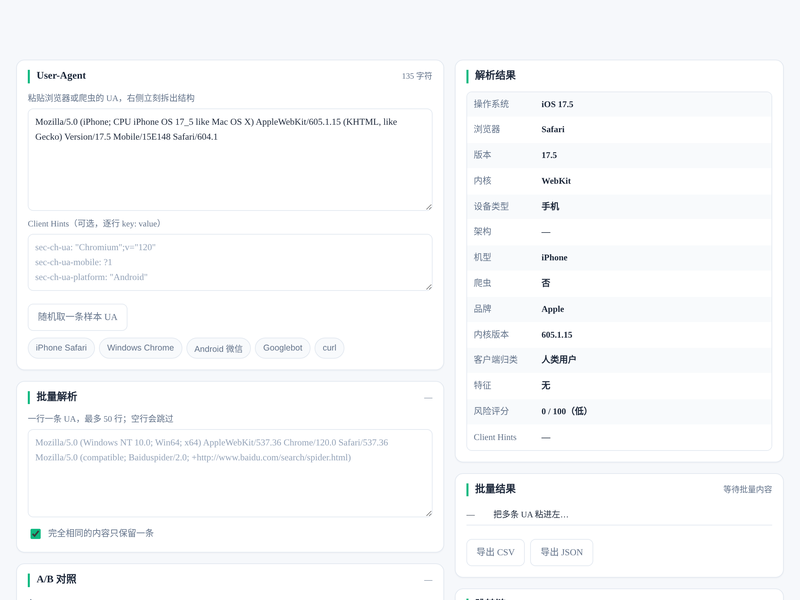
- Paste a browser or bot UA into the first box and the eight fields fill in immediately.
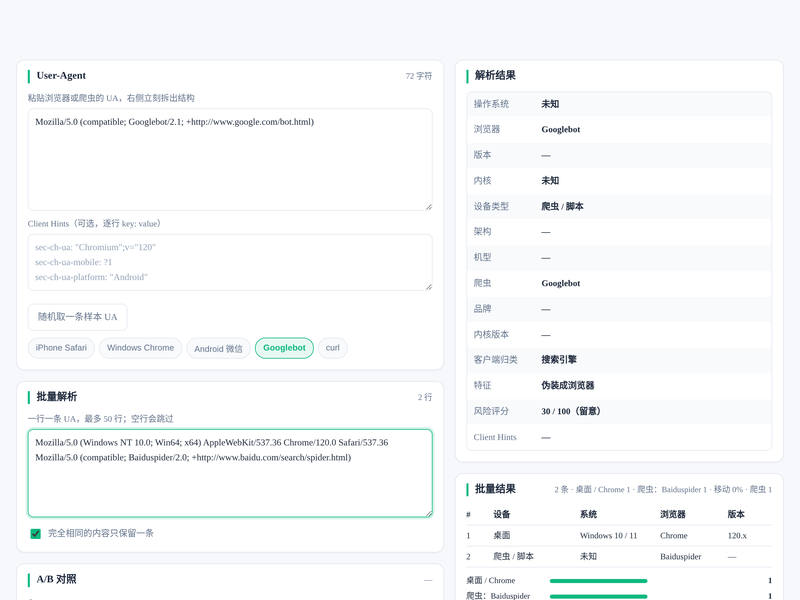
- Use the sample chips to compare iPhone, Windows, WeChat, Googlebot and curl.
- Paste a short link or a URL with redirect parameters into the second box.
- Read the last hop and the source parameters to see where the link really lands.
- Copy the JSON into a ticket, log or test record.
Screenshots
These three shots come from the final build of this plugin.
Features in detail
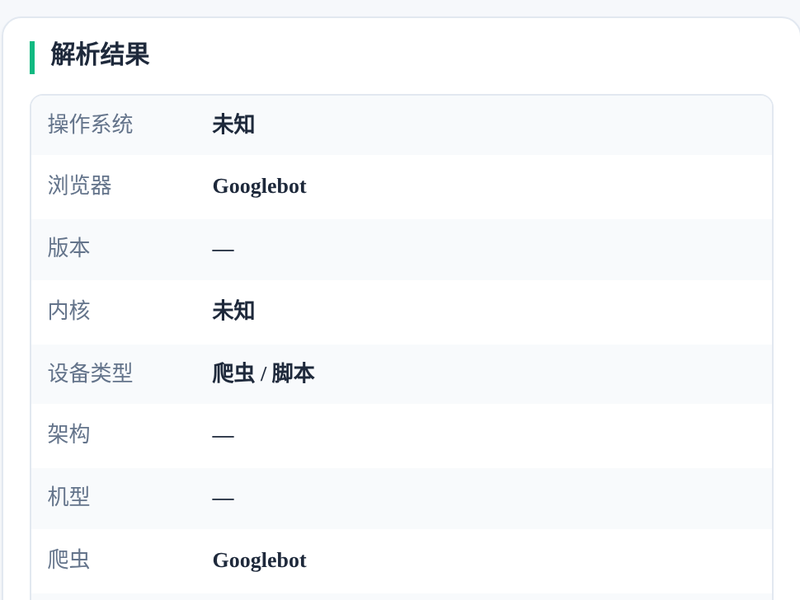
Eight UA fields: OS, browser, version, engine, device type, architecture, model and bot flag.
Built-in samples: iPhone Safari, Windows Chrome, Android WeChat, Googlebot and curl, one click each.
Layer-by-layer decoding: finds the next hop in u, url, target and redirect parameters, up to five layers with loop protection.
Fragment support: handles redirects and Base64 payloads inside the hash.
Source parameters: utm_source, from and channel are listed together for channel attribution.
JSON export:the parse result and link are copied as JSON for tickets or logs.
What you get
Inputs
- A UA string is required and refreshes the eight fields.
- A short link is optional and may contain redirect parameters or hash fragments.
Outputs
- Eight parsed UA fields.
- Each hop of the redirect chain, source parameters and a JSON summary.
Parameters
The workspace exposes 4 controls, from De-duplicate identical entries to Paste a redirect URL or a resolved short link, and every one of them only affects the local rendering: nothing is sent back to a server.
| Control | Type | Range or options |
|---|---|---|
| De-duplicate identical entries | switch | - |
| A | text | - |
| B | text | - |
| Paste a redirect URL or a resolved short link | text | - |
Typical cases
- A layout bug only reproduces inside WeChat and you need the UA signature.
- You have a redirect link and want to see the landing page without clicking.
- Checking whether utm parameters survived the redirect chain.
In each of these cases the pass is the same: load the file, make one change, check the preview, export and reopen. Skipping the reopen step is why people later discover a transparent halo or a truncated table that looked fine on screen.
A worked pass
Step 1: Paste a browser or bot UA into the first box and the eight fields fill in immediately. Read the hint line before touching anything: it tells you which prerequisite is missing.
Step 2: Use the sample chips to compare iPhone, Windows, WeChat, Googlebot and curl. Do not start with the most extreme setting; one small change is enough to see whether the result moves in the right direction.
Step 3: Paste a short link or a URL with redirect parameters into the second box. Check the preview at 100% rather than the fitted view, because artefacts often hide in the downsampled version.
Step 4: Read the last hop and the source parameters to see where the link really lands. Export once, open the file in a local viewer, and only then decide the settings are final.
Step 5: Copy the JSON into a ticket, log or test record. Keep the source file untouched so you can repeat the pass with a different setting without re-importing.
Walking through the controls
The De-duplicate identical entries switch is a binary choice. Turn it off first to record what the default output looks like, then turn it back on and export once so you can confirm the difference survives outside the preview. On a slow machine the redraw is scheduled rather than immediate, so wait for the status line to settle before judging the result.
The A field accepts free text. Paste a realistic value rather than a placeholder, because both the preview and the exported file depend on what you type here; an empty value usually means the tool falls back to a default derived from the file itself.
The B field accepts free text. Paste a realistic value rather than a placeholder, because both the preview and the exported file depend on what you type here; an empty value usually means the tool falls back to a default derived from the file itself.
The Paste a redirect URL or a resolved short link field accepts free text. Paste a realistic value rather than a placeholder, because both the preview and the exported file depend on what you type here; an empty value usually means the tool falls back to a default derived from the file itself.
Practical notes
Keep the browser window above 1200 pixels wide while working: below that the right column collapses under the left one and you lose the side-by-side view.
Use the reset control between experiments; carrying state from a previous pass is the most common reason a setting appears to have no effect.
If a control looks unresponsive, check the hint line first: most no-op states are caused by a missing file rather than a broken button.
Export after every meaningful change rather than at the very end, so you still have a known-good file if the next experiment goes wrong.
On a laptop with a scaled display the preview is drawn at device pixel ratio, so text that looks crisp on screen stays crisp in the exported image at the same size.
Compare your result against the limits section: if you are working outside the documented range, the tool may still run but the output quality is not guaranteed.
Long sessions are fine because nothing is uploaded, but reload before switching to a different kind of file so cached state cannot leak into the new pass.
The controls you will touch most often here are De-duplicate identical entries, A, B, Paste a redirect URL or a resolved short link.
Self-check list
Run the workflow once with a real file and confirm the result pane shows content, not the empty state.
Push every slider to its minimum and maximum and confirm the readout follows without an error.
Switch each dropdown and confirm the preview and the export change together.
Export once and reopen the file with a local viewer to confirm it is not truncated.
Reset the workspace and confirm all panels return to the empty state.
Reload the page and confirm no previous result is restored by accident.
FAQ
Q: Why does the short link not resolve to the final URL?
A: Short-link services usually decide the target server-side through a 302, so no plain URL exists in the parameters. Decoding only covers what the URL carries; open it once to see the destination.
Q: Why is the version sometimes wrong?
A: Some browsers reduce the UA and freeze the version string. Client Hints or capability detection fills the gap.
Q: It says bot but the visitor is human. What now?
A: UA can be forged or reused by proxies. Combine behaviour, IP and request rate instead of blocking on UA alone.
Q: The same phone reports different results twice.
A: In-app WebViews send a different UA from the system browser and often append an app identifier, so a changing result is expected.
Q: A short link does not resolve to a target.
A: Some services map codes server-side with a 302 and never expose the destination; in that case only the code is available and the landing page must be checked in the provider dashboard.
Q: Why do some short links not unfold?
A: No plain URL exists in the parameters and the server decides the hop with a 302. Open the link once to see the landing page.
Q: Does the file leave my device?
A: No. Everything runs inside the browser; requireNetwork is false and no upload happens.
Q: Which browsers does it run in?
A: Current Chrome, Edge, Firefox and Safari builds; no extension or plugin is needed.
Q: Why does the exported file differ in size from the source?
A: The export re-encodes the result, so size follows the chosen format and quality settings.
Limits
- Parses UA and URL parameters only; no short-link requests, DNS or certificate lookups.
- Bot and device lists are common sets and cannot cover every client.
- The chain stops after five hops.
Design trade-offs
Parsing follows a fixed order: crawler first, then platform, then browser and engine, then device class and architecture. The order matters because most UA strings mention Mozilla, AppleWebKit and Chrome at once, and the first hit decides the answer.
Each dimension is one short pattern that returns on first match, so eight lookups finish within microseconds and the UI needs no debounce. Short-link decoding tries known parameter names, then Base64 and hash fragments, up to five layers.
Troubleshooting
Crawlers often disguise themselves by changing only one or two fields; the tool deliberately overwrites the browser fields with the crawler name and a dash.
Some short links carry the target in the path rather than a parameter, so paste the whole link and let it try path and Base64 decoding.
UTM values are shown for reference only and never affect redirect resolution; utm_source and a link service source are different things with similar names.
Workflow and acceptance
When traffic looks wrong, check the crawler flag first and the decoded destination second; only then decide whether the campaign or the measurement is at fault.
Read nested short links layer by layer: the first layer is the link service, the second is often the ad platform, and the utm values usually sit in the last one.
Accept when desktop and mobile UAs classify correctly, crawler samples rewrite the browser fields, five layers expand without looping, and the copied JSON parses as-is.
Performance and resource budget
Single-UA parsing is a series of regex hits, typically 3 to 5 ms - perceptually instant. Batch mode loops by line and the 50-line cap keeps the worst case within tens of milliseconds; de-duplication is one hash pass, linear in lines.
The UI renders single and batch results separately: eight key-value rows versus a compact table. Batch has a signature guard so an unchanged list and de-dupe switch do not rebuild the table and reset scroll position.
Short-link parsing is pure string and URL decoding with no network, so it is instant offline - and that also means it cannot expand a real short link, only expose its parameters.
Worked case: device and crawler mix in one log slice
Scenario: fifty exported UAs; find the mobile share, browser mix and how much is crawlers. Approach: paste them all. The plugin aggregates by device and crawler into a summary such as "desktop / Chrome 12, mobile / WeChat 9, crawler: Baiduspider 4", while the single-parse panel keeps the full eight fields for the latest entry so a suspicious source can be inspected.
Why de-duplicate: the same device repeats, so de-duped counts answer "how many device kinds", not "how many requests". Mixing those two is the classic misread - fifty lines may be only twelve distinct devices with thirty-eight repeats.
With short links: campaign URLs carrying ?utm_source=wx&utm_medium=qr are tabulated by the short-link panel, and combined with device detection you can separate "scanned inside WeChat" from "opened directly in a browser". It does not expand links online, so the real destination still belongs in server logs.
Version and compliance
This build is v1.6.1 on ToolCMS plugin spec 3.19, schemaVersion 2.1 and coreVersion 3.7.4. All processing happens inside the browser, requireNetwork is false and no file leaves the device.